
In the Pur version, all routing is handled automatically by the system. Required data streams are detected and routed without user intervention, and no manual enabling or configuration of individual ports is necessary. This significantly simplifies setup and prevents incorrect or inefficient routing configurations.
Unused interfaces and data paths are automatically managed by the system and do not occupy unnecessary resources such as CPU or RAM. As a result, full performance is always available for core vario operation, regardless of the connected devices.
Incoming data from external sources—such as FLARM, GPS, or control commands—is always processed by the XCVario independently of any routing configuration. Likewise, XCVario-generated data is automatically routed to all required interfaces, including the CAN bus when the device is operating as master device.
All routing in the Pur version is inherently bidirectional, meaning data is exchanged in both directions automatically. Each interface is internally managed so that only valid and necessary connections are established. There is no need to configure manually data mappings, as this is fully controlled by the system logic. This automatic routing concept not only simplifies configuration but also minimizes the risk of misconfiguration and ensures optimal system performance under all operating conditions.
XCVario, wireless Navi and FLARM

The most common application in a single-seater glider corresponds to the default delivery configuration. In this setup, a wireless navigation device and a FLARM with standard IGC connection can be connected via plug & play, without requiring any additional configuration.
All required data streams are handled automatically. XCVario data is routed to the wireless interface, and FLARM data received on S1 is automatically forwarded to the wireless connection as well. This ensures that the navigation system receives a GPS fix and that FLARM traffic information from nearby aircraft is available for display.
Interfaces S2 and the CAN bus are not used in this configuration and therefore remain inactive.
Since this setup represents the factory default and the Pur Edition manages all routing internally, no router configuration is present. The system is immediately ready for operation after connecting the devices. The internal principles route the data on an application level from sensors towards the “Navi” device.
For general information on the system setup and interface descriptions, please refer to the Setup chapter.
XCVario, wired Navi and FLARM
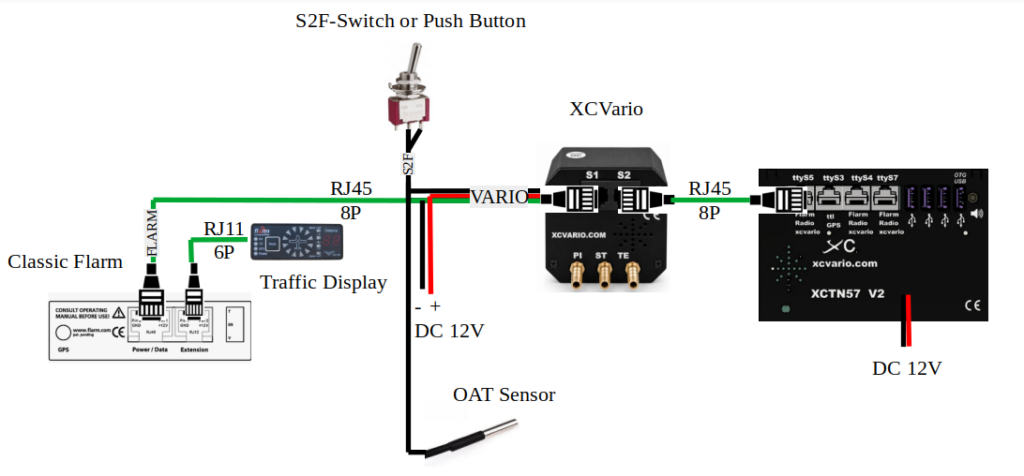
When using a wired navigation device such as XCTouchNav, Kobo, OpenVario, IPX, or similar, a Navi has to be configured at S2 to enable data exchange via S2 and connected from there via a RJ45 cable as shown to the dedicated port for XCVario on that Navi.
FLARM data received on a FLARM configured to interface S1 is automatically forwarded to the wired navigation device connected to S2, ensuring full availability of GPS position, traffic information, and all required NMEA data.
The wireless interface can remain enabled on the XCVario in parallel. This allows a second navigation device to be connected wirelessly if needed—for example, in the event of a power supply issue with the permanently installed navigation device or as a fallback in case of device failure.
Additionally, the IGC file can be downloaded wirelessly to a mobile phone after the flight and declared to OLC or weglide directly from there. SD cards or USB sticks also for classic FLARMS are history using wireless technique. The navigation device connected to S2 can remain permanently installed in the cockpit. This eliminates the need for removable storage media such as memory cards or USB sticks for data transfer.
Two XCVario, two wireless Navis and FLARM

For two-seater aircraft with two wireless navigation systems, the following configuration is available and supported as a standard setup.
The front XCVario unit is connected to the FLARM via interface S1. The rear-seat display is connected to the front unit via the CAN bus, which is used to transmit all relevant XCVario data to the second display. In this configuration, only the front unit requires a connection to the FLARM.
This setup represents the simplest configuration for two-seaters. It requires only a 1:1 patch cable between the S2 interfaces of the front and rear XCVario units.
Two XCVario, two wired Navis and Power FLARM

For two-seater aircraft with two wired navigation systems, we recommend the wired configuration as shown above that is most robust against radio interference and consumes less power as no WIFI or Bluetooth connection is required.
Here both XCVarios are also connected via CAN bus. The front navigation system is connected to the front XCVario unit and the rear navigation system to the rear unit. Two of our S2 interface extenders are required to have access to the serial RS232 port on S2.


