
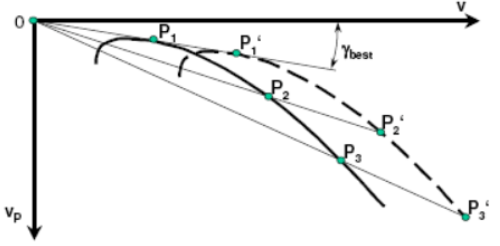
In the polar dialog, the right polar for the aircraft type is selected, masses can be adjusted and the polar that is set can be tuned manually.
Type
[User Polar]
[Antares 20E]
[ASK 21]
:
This setting is used to select the flight polar corresponding to the aircraft type. In addition to the predefined entries, the first entry stands for a user defined polar that is provided for aircraft types that are not included in the library. The user polar is selected by default and is initialized with values corresponding to an LS4a. These values can be adjusted to match any custom or measured flight polar.
Any modifications made to the selected polar are automatically reset when a different aircraft type is chosen. In normal operation, only the aircraft type needs to be selected; manual adjustment of these parameters is usually unnecessary. All gliders in the database that are equipped with flaps provide recommended speed ranges per flap setting as written in flight manual, or taken from diagrams or polars. Additional aircraft types can be integrated into the library by XCVario upon request and become available automatically with the next software update.
A continuously growing polar library is provided. The current list of supported aircraft polars can be found in the GitHub repository in the file PolarTable.txt.
Reference Polar
Ref Wingload
34.4 kg/m2
Using the following setting, the reference wing loading and the sink rates for individual airspeeds can be modified. The reference wing loading represents the condition under which the flight polar was measured and is typically specified with the polar data. If the actual wing loading of the aircraft is higher, even without water ballast, this must be accounted for using the Empty Weight setting described below. In general, the reference wing loading should not be changed and should always match the values provided with the selected polar.
Speed 1, 2 ,3
Speed 1:  80 km/h  Sink 1: -0.66 m/s
SPeed 2: 125 km/h Sink 2: -0.97 m/s
Speed 3: 175 km/h Sink 3: -2.24 m/s
For the selected reference wing loading, the corresponding sink rates are defined at three operating points using Sink 1, Sink 2, and Sink 3, each associated with a specific airspeed via Speed 1, Speed 2, and Speed 3.
Ideally, the first speed is chosen close to the minimum sink speed, the second represents a typical cruise speed, and the third corresponds to a higher airspeed relevant for fast cruise operation. You may modify those values at any time, but when a new polar is selected, the modification are lost and new defaults from the polar library will show up for the new glider.
Stall Speed
74 km/h
This setting defines the aircraft’s stall speed and is used by the XCVario for flight state awareness and speed-related indications. The stall speed should be configured according to the aircraft flight manual and must correspond to the clean configuration without airbrakes extended. The entered value represents the stall speed at the reference wing loading. Changes in wing loading due to ballast or payload are taken into account automatically by the system, provided the corresponding weight settings are configured correctly.
Correct configuration of the stall speed is essential for accurate speed margin indications and related flight safety functions.
Max Ballast
160.00 liters
This setting allows you to adjust the maximum permissible water ballast. The default value is typically defined by the aircraft type and sourced from the polar library according to the manufacturer’s specifications. It can be modified here to account for changes such as winglets or different water ballast tank installations.
Wing Area
10.5 m²
This setting allows you to adjust the wing area. Although this parameter is normally defined by the aircraft type, it can be modified here to account for changes such as attachable wing extensions or winglets.
Empty Weight
265 kg
The “Empty Weight” parameter allows a more accurate definition of the aircraft’s empty mass. Over time, gliders often gain weight due to added instruments, winglets, repainting, or moisture absorption in the composite structure (CFRP or GFRP). To account for this, the empty mass can be set higher than the original value used to derive the gliding polars.
By default, when a polar is selected, the empty mass is calculated as the flight mass minus the pilot’s weight. Increasing the empty mass raises the wing loading, improving performance at higher speeds, similar to the effect of adding water ballast.
Maximum Speed
270 km/h
By default, the maximum target speed is set to 270 km/h IAS (indicated airspeed). The S2F computer is using it to limit any commanded speed accordingly.
Flap Levels
NOTE: The speed ranges assigned to each flap setting are derived either from the aircraft flight polar or from the aircraft flight manual. Flap speeds are included in the XCVario polar library.
Takeoff Flap
4 .
This setting controls the assistant to show the designated takeoff position (usually first positive detent) before takeoff. This setting provides increased lift at low airspeed with acceptable drag during ground roll and initial climb. Maintain takeoff flaps until safe airspeed and height are achieved, then retract smoothly to neutral or climb configuration.
Add Level
Label: -2
Minimum Speed: 155 kmh
Create it: [ Cancel / Yes ]
Each level consists of a label and the minimum speed for it’s speed band.
Set the label for the new flap level. Flap lables can have up to three characters and can be manipulated through the line text editor. It has two modi: Move the cursor as the character is displayed in yellow; press button and change the character in red with the rotary knob. A short press toggles the mode. Long press exits the line editor. An underscore “_” represents a space in the line editor.
Set the minimum speed at which this flap setting is recommended to use. Mass conditions according to the given polar reference.
Confirm at the end of this dialog to create the flap level. It will be sorted into the list according to the speed you entered.
Change a level (0. Level +2> 74 kmh)
Enter into each level and change speed, label or remove that level by selecting “Yes” in the corresponding field and push to confirm.
Label: +2
Minimum Speed: 74 kmh
Remove level: [ Cancel | Yes ]
An example of how this list may appear.


